What Is Form 8821?
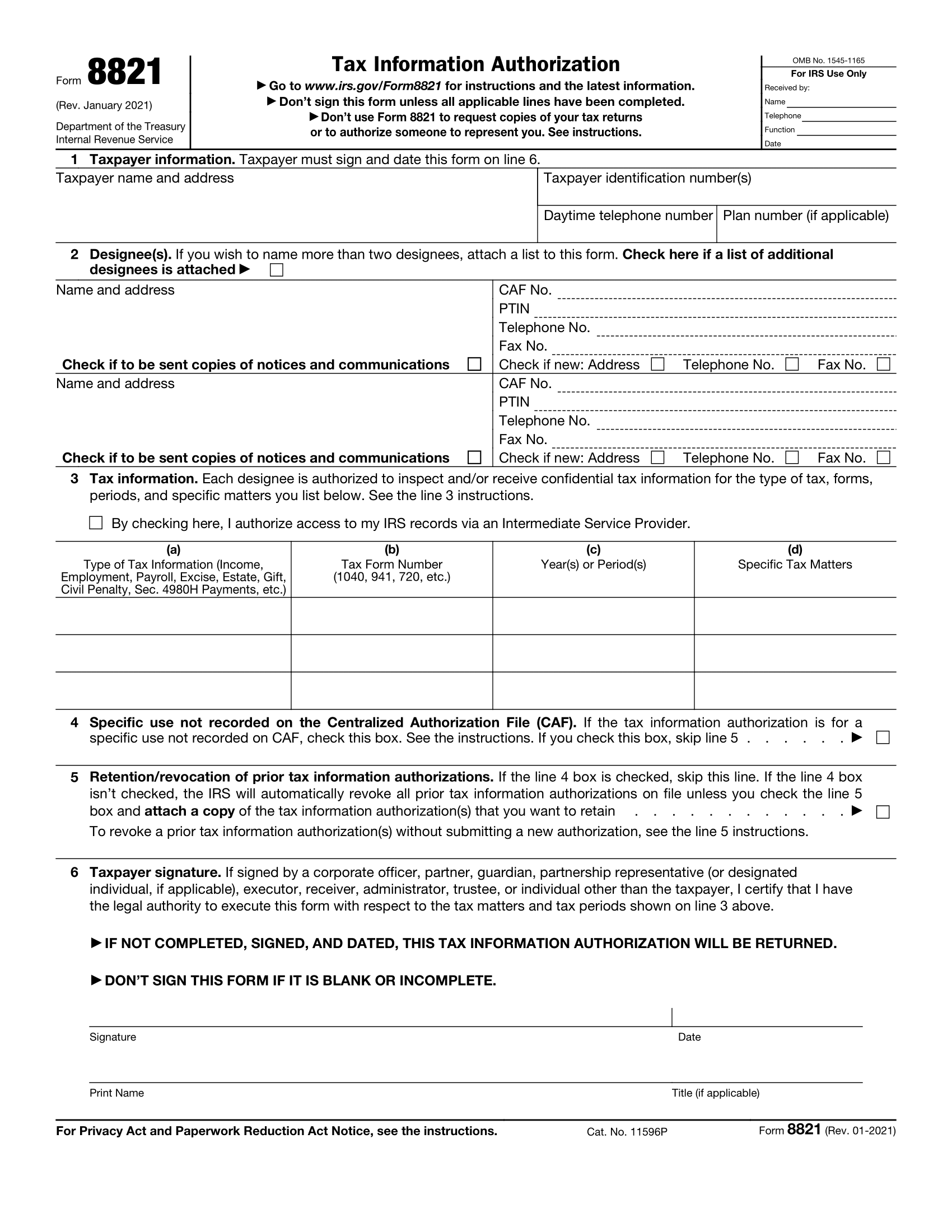
Form 8821 is an IRS Tax Information Authorization form that allows tax preparers to access information on a client’s behalf. Financial and insurance institutions use this form to get confidential information about a client’s tax status.
Legal Templates offers a free Form 8821 template for you to fill out and download. Our customizable form includes the necessary information and formatting to get approval from the IRS.
The IRS reports that there are currently no new updates to Form 8821 for the 2025 tax year.
When to Use Form 8821
Form 8821 is used to control who has access to your tax information. You can revoke or provide access to other individuals or organizations. Use Form 8821 for any of the following actions:
- To revoke prior tax information authorizations.
- To allow an individual, organization, or business to obtain confidential information.
- To stay informed about client IRS notices and other correspondence.
- To view the taxpayer’s payment history.
- To grant access to information without a qualified representative status to individuals in a firm, business, or organization.
If your form is being used to share private tax information for non-tax-related issues, you must send your Form 8821 to the IRS within 120 days of signing. This 120-day requirement does not apply when Form 8821 is being used to authorize disclosure for help with a tax matter with the IRS.
Form 8821 vs. Form 2848
Form 8821 grants access to a taxpayer’s information, while Form 2848 goes one step further to allow another individual to act on the taxpayer’s behalf. Financial institutions and professionals frequently use Form 8821 to obtain tax records from their clients. In contrast, an appointed agent may use Form 2848 to gain tax powers of attorney and make tax decisions on the taxpayer’s behalf.
How to Fill Out Form 8821
Since Form 8821 deals with sensitive information, it’s essential to complete it accurately. Including the correct information, formatting, and requirements ensures the IRS accepts the form and grants the access you need. Use the following steps to fill out Form 8821.
1. Verify the Client’s Identity
Tax professionals or individuals completing Form 8821 on behalf of another person must begin by confirming the taxpayer’s identity by verifying a photo ID, passport, or social security card.
If you use this form to access tax information for a business or organization, start by obtaining its Taxpayer Identification Number (TIN) or Employer Identification Number (EIN). Then, check the business representative’s identity and confirm their authority to act on behalf of the organization.
2. Enter Taxpayer and Designee Details
Once you’ve confirmed the correct identity, provide the necessary taxpayer and designee information. The taxpayer refers to the individual whose information you are requesting, and the designee refers to the individual or business looking to gain access. Provide the proper information for each party on lines 1 and 2, including the following:
- Full legal name
- Mailing address
- Phone number
- Social security number or TIN
Note that you can name more than one designee and ensure you provide information for all named parties.
Also, enter the designee’s Centralized Authorization File (CAF) number, a unique nine-digit number assigned by the IRS to parties requesting third-party authorizations. If your designee has a CAF number from a previous Form 8821 or Form 2848, use it. If not, enter “NONE,” and the IRS will assign one.
3. Grant Access
Indicate the type of tax information the designee can access. This may include any of the following:
- Income taxes
- Employment taxes
- Excise taxes
- Payroll tax
Also, outline the exact forms the designee can access and the years or time frame they can review. For example, you can list “Income, 1040” for the calendar year “2024” and “Excise, 720” for the same year (covering all quarters in 2024).
General references like “All years,” “All periods,” or “All taxes,” will not be accepted. To include multiple years or a series of inclusive periods, including quarterly periods, you can enter “2020 through 2024” or “2nd 2020–3rd 2024.” For fiscal years, please enter the ending year and month in the format “YYYYMM.”
4. Select CAF Recording and Prior Authorizations
Most tax records and authorizations are recorded in the IRS CAF system. However, certain uses are exempt from being recorded. Check the box on line 4 if your Form 8821 is for non-recorded use, as indicated by the IRS.
If you do not check the box on line 4, the IRS automatically revokes previous authorizations for tax information unless you request otherwise. You can request that previous authorizations remain intact by checking the box on line 5.
5. Sign and Date
Once you have completed the form, the taxpayer needs to sign and date it to ensure the IRS accepts and grants their request. Ensure the end of your document includes the following elements:
- Taxpayer’s printed name
- Taxpayer’s signature
- Date of the signature
6. Submit Forms to the IRS
Submit your completed and signed 8821 form to the IRS via mail, fax, or the IRS authorization tool. Check the IRS Where To File Chart to determine the correct fax number or mailing address for your state of residence. Note that you cannot mail or fax an electronically signed Form 8821 to the IRS. Mailed or faxed forms must have a “wet” ink signature.
IRS Form 8821 Sample
Use Legal Templates free Form 8821 to authorize access to your tax information. Use our editor to fill in and download your documents, available in PDF format.